
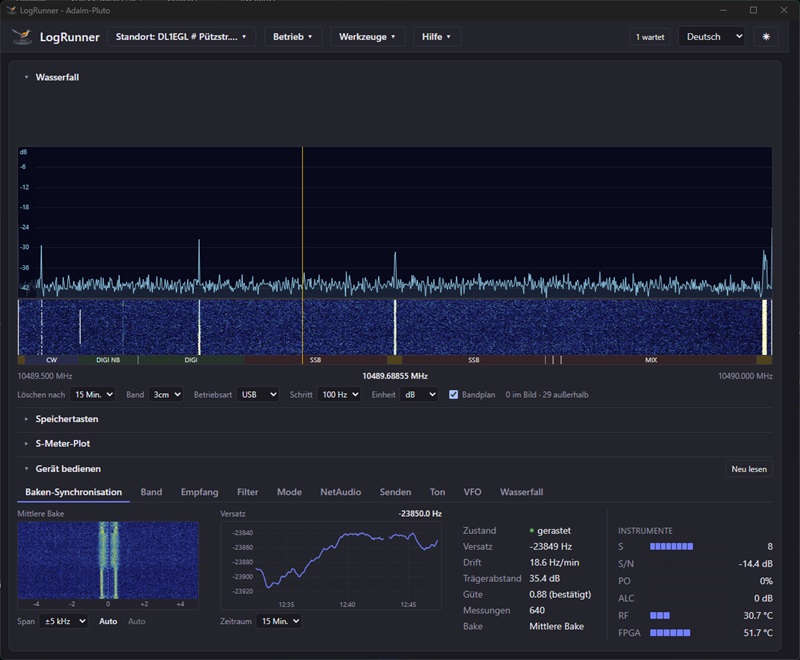
Starting with version 0.9.5b52 , LogRunner supports the Analog Devices ADALM-Pluto directly. In the TRX client, you select the Pluto as a device just like an Icom, Kenwood or Yaesu transceiver. The remaining configuration is currently geared towards operation via QO-100. With the right hardware, you can use it to operate amateur radio via the satellite.
Hardware:
- Adalm Pluto
- With the Adalm Pluto’s original firmware, PTT activation does not occur. In this case, a downstream PA must be equipped with an RF Vox.
- With the F5OEO firmware release 0.5.16.7, PTT is activated. The Adalm Pluto must be equipped with an additional circuit board to be able to switch the PTT line of the downstream PA. Information on the PTT modification can be found here, among other places: ANALOG DEVICES ADALM-PLUTO – DL1EGL
- Pluto Plus
- Depending on the supplier, the Pluto Plus is shipped with firmware version 0.32-1-g7bdc-dirty. A PTT line is routed through the USB port. An interface board must be connected to this line to enable switching of the PTT line of the downstream PA. More information about the Pluto Plus is available here: plutoplus/plutoplus: The PlutoSDR+ repository
The key highlights at a glance:
- Familiar operation: The user interface follows the design of the Icom transceivers and is reduced to the essentials.
- Frequency tuning: VFO-A, VFO-B and separate RIT and XIT are available. If the other station is not exactly on your transmit frequency, you can conveniently correct this with the RIT.
- Beacon synchronization: LogRunner automatically locks onto the middle beacon of QO-100 to compensate for LNB drift. To do this, it looks for the beacon’s typical signal pattern and snaps to its frequency. The LNB drift is documented as a graph over time.
- Noise filter (optional): The switchable noise filter, based on the OM-LSA + IMCRA method, removes noise from the useful signal. Strong chirping and warbling signals do not affect the filter result.
- Footprint on the map: The map view now shows the QO-100 footprint. Clicking on the map also displays the elevation and azimuth.
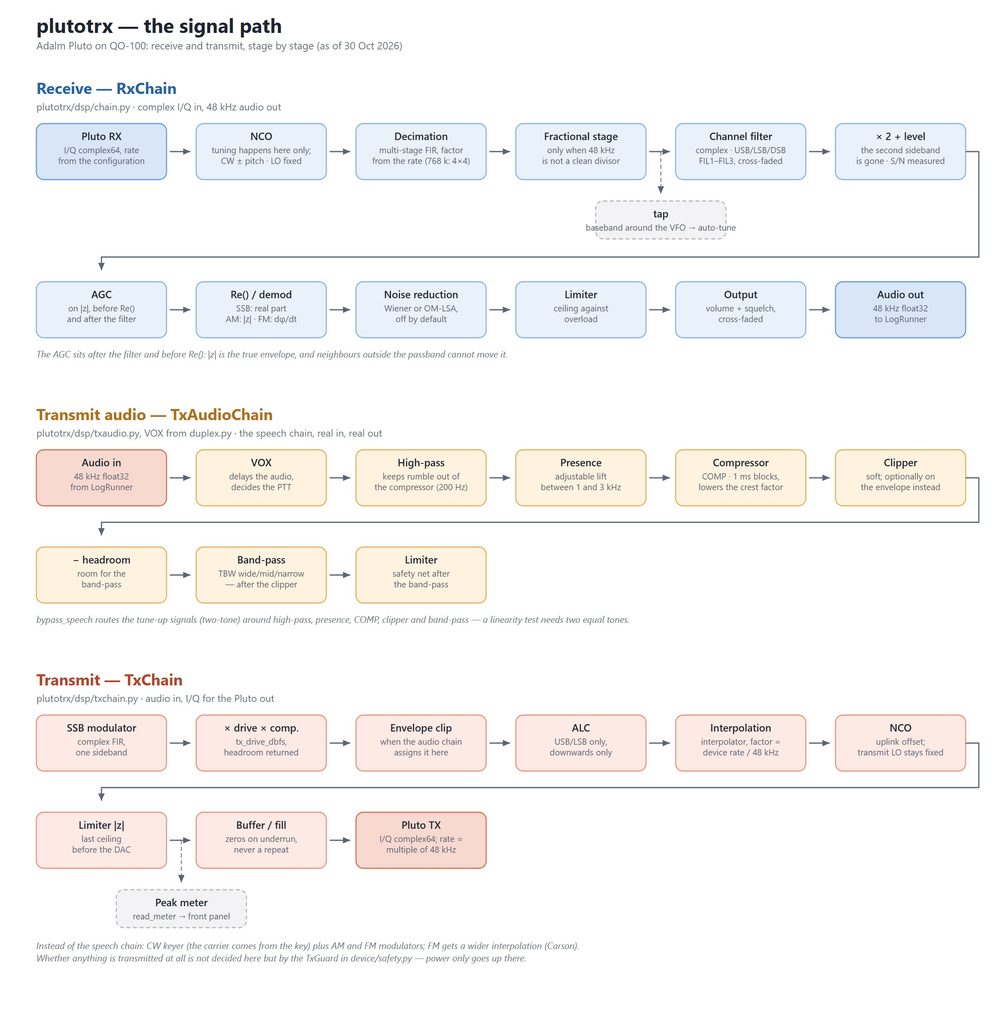
Signal path
Watch PlutoTRX on Youtube
QO-100 DP0GVN mit PlutoTRX u. LogRunner mit aktivem OM-LSA Filter.
Instructions – ADALM-Pluto or Pluto Plus in a LiveLocal Window
A quick guide explaining how to set up LogRunner for use with the PlutoTRX module is available for download here (Download).