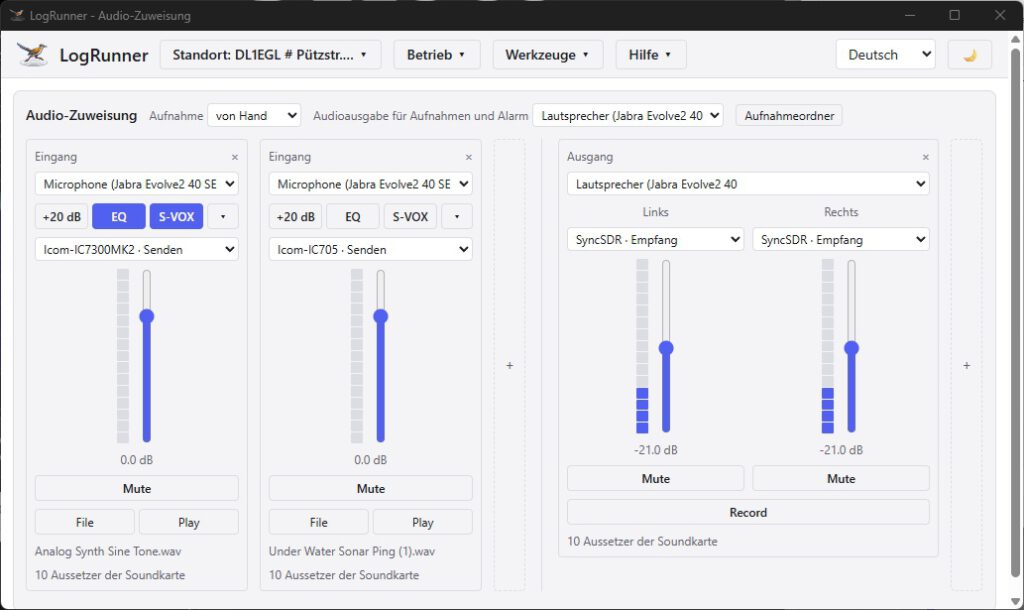
With the Audio Assignment tool, LogRunner provides its own virtual mixing desk for transceivers that supply their audio and microphone signals via USB or LAN. There are no artificial limitations on the number of input and output signals.
The key features at a glance:
- Input (microphone & audio sources):
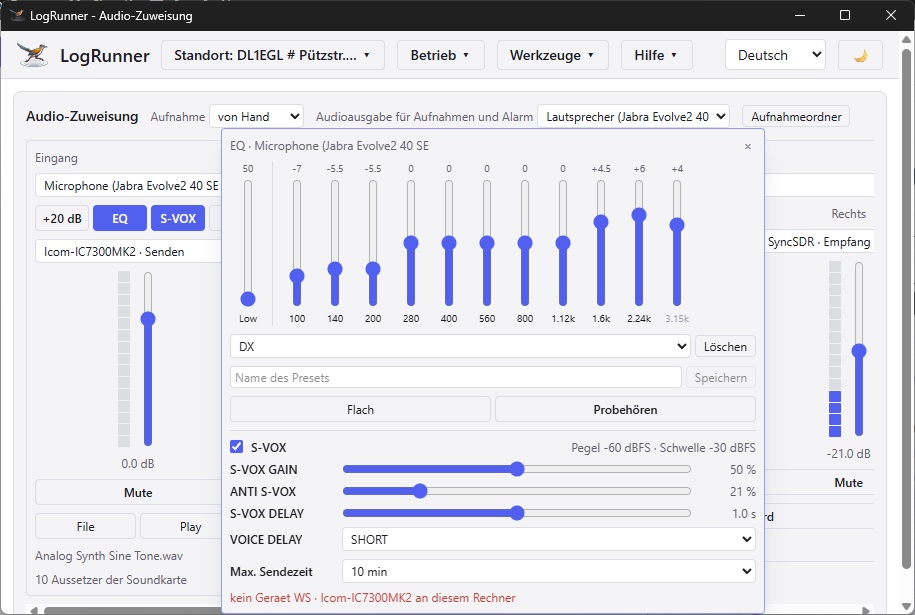
- Signal processing: Includes its own equaliser, S-VOX and optional level boost of +20 dB.
- Real-time monitoring: A level meter (VU meter) displays the signal; volume sliders and a mute button allow for quick adjustments.
- Audio playback: .WAV files can be played back using the File and Play buttons – ideal for playing direct audio feedback to other stations.
- Output (headphones & speakers):
- Stereo splitting: The right and left channels can be assigned signals from different transceivers completely independently (e.g. when comparing two devices or antennas on the same signal).
- Perfectly combined: Together with the LogRunner function SyncVFO, both transceivers operate in perfect synchronisation.
- Smart recording function:
- Manual & Automatic Recording: The headphone signal can be recorded manually at any time. If automatic recording is activated, it starts precisely when a call sign is entered into the QSO form and stops when the entry is logged.
- Logbook Integration: Audio recordings are linked directly to the relevant QSO entry and can be conveniently played back later from within the log.
Audio Assignment
EQ and S-VOX